Image Reader
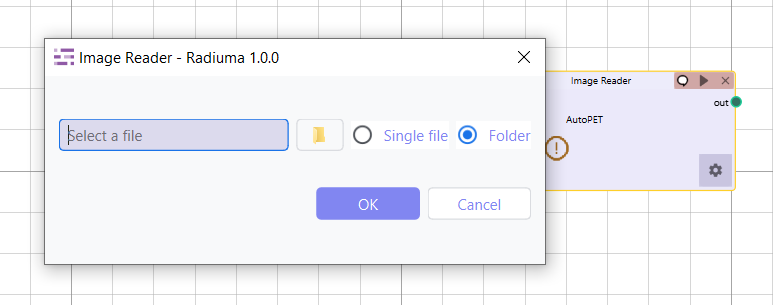
The Image Reader module serves as the primary gateway for importing diverse medical imaging formats into the Radiuma platform, providing a flexible and intuitive interface for handling complex multi-modal datasets. This essential tool enables seamless integration of clinical imaging data from various sources and modalities, supporting DICOM directories, NIFTI files, NRRD formats, and other common medical image types. Through a structured import workflow, users can efficiently organize and load patient studies whether working with single files or complex folder hierarchies containing multiple patients and imaging sequences. The module automatically detects and validates image formats, ensures proper organization by modality and patient, and prepares datasets for downstream processing in Radiuma’s analytical pipeline—making it the foundational first step for all medical image analysis workflows within the platform.
Key Parameters
Source Type: Choose between folder or single file import
Path: Location of the medical image file(s) to import
How to Import Data
Radiuma supports importing images from multiple sources and modalities, allowing users to efficiently bring in medical data for further processing. Here’s how to import your data, whether you have DICOM images, NIFTI files, or other formats.
Selecting the Source Type
You can import your images either from a folder containing multiple files or a single file:
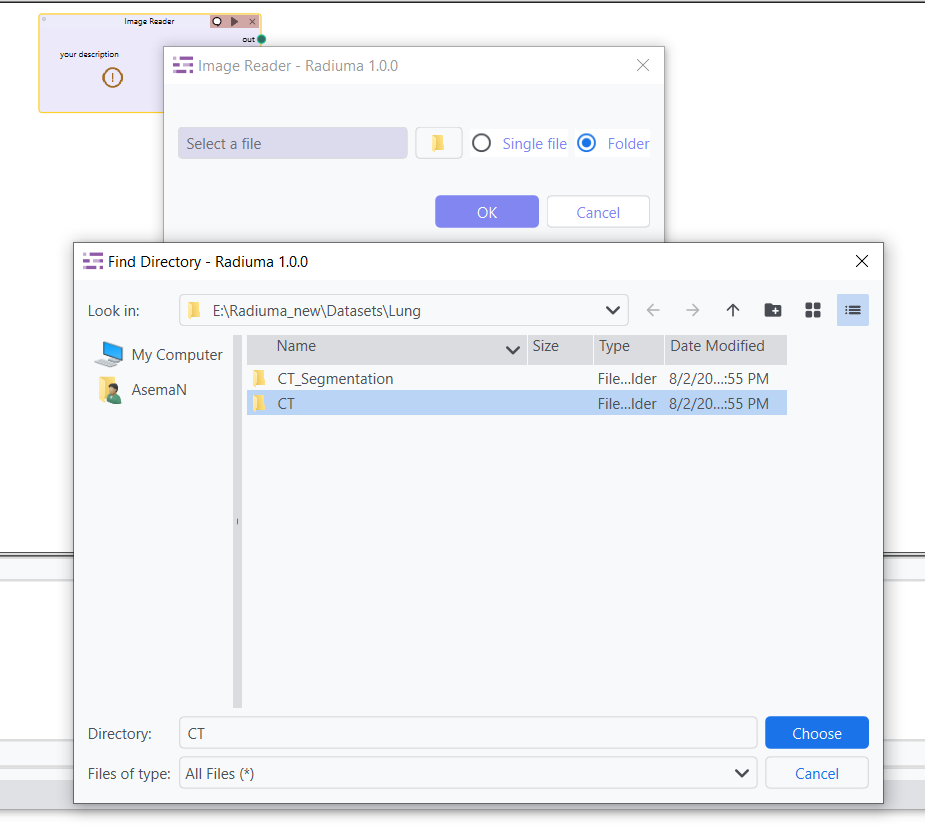
Folder Import: Choose Folder if your data is organized in directories, such as when images are grouped by patient or modality (e.g., CT, MRI). You will select the main directory, and Radiuma will automatically detect and import all the relevant files from its subfolders.
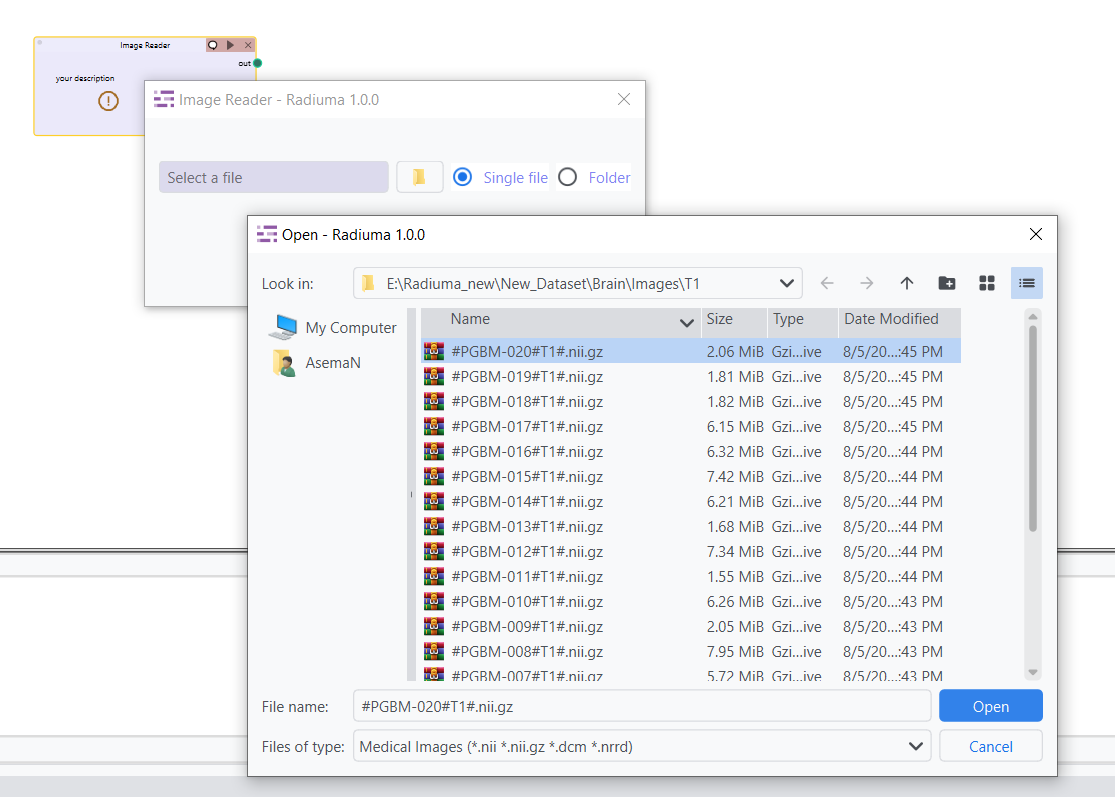
Single File Import: Select Single File to import an individual image file, such as a single .dcm (DICOM), .nii or .nii.gz (NIFTI), or .nrrd file.
Importing Multi-DICOM Images for Multiple Patients
Radiuma allows you to import DICOM files organized by patient-specific subfolders. If you have images for multiple patients with various modalities, you can organize DICOM files into separate subfolders for each patient and modality.
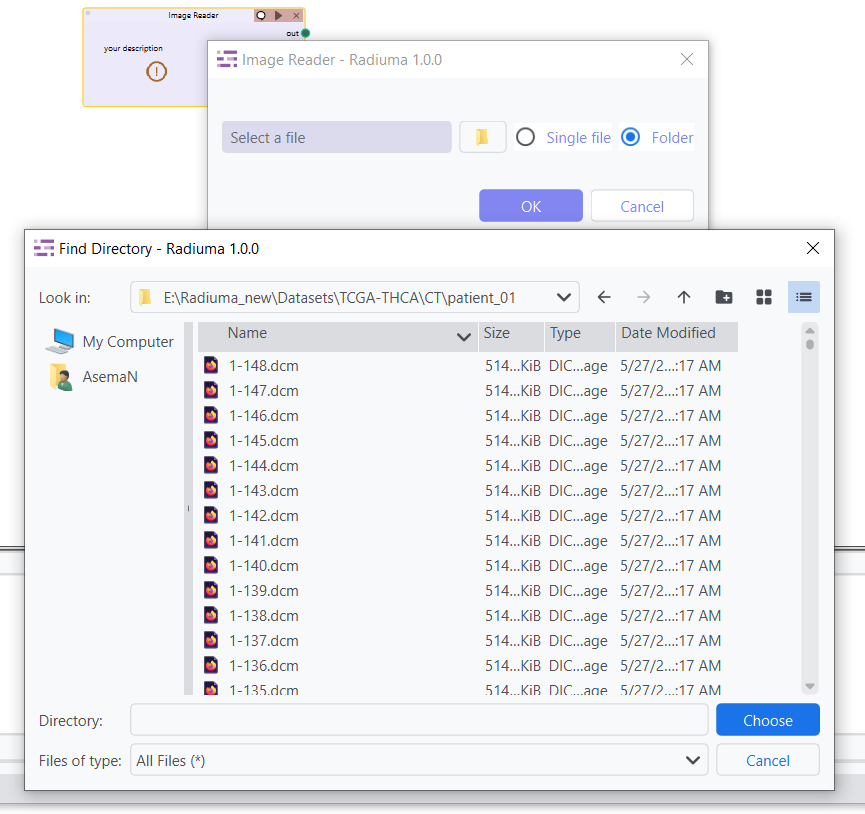
Example Folder Structure for DICOM images:
- /CT
- /patient_01
patient_01_ct_001.dcm patient_01_ct_002.dcm
- /patient_02
patient_02_ct_001.dcm patient_02_ct_002.dcm
In this case, Radiuma will process the DICOM files inside each patient’s subfolder (e.g., /patient_01/ and /patient_02/). If your data is structured like this, select the main folder (e.g., /CT) and Radiuma will automatically organize and import the files.
Important Note: Radiuma supports DICOM images inside subfolders. Each patient should have their own folder (e.g., /patient_01/) containing their corresponding DICOM files.
Importing NIFTI (.nii, .nii.gz) Files
NIFTI files are commonly used in medical imaging. Radiuma supports NIFTI files such as .nii and .nii.gz. However, for NIFTI imports, the files need to be organized by modality and sequence into subfolders for easy identification.
Correct Folder Structure for NIFTI Files:
/CT/ for CT images.
/MRI/T1/ for T1-weighted MRI images.
/MRI/T2/ for T2-weighted MRI images.
/MRI/DCE/ for DCE (Dynamic Contrast Enhanced) MRI images.
Example Folder Structure for NIFTI files:
- /CT
- /patient_01
patient_01_ct_001.nii, patient_01_ct_002.nii
- /MRI
- /T1
patient_01_t1_001.nii, patient_01_t1_002.nii
- /T2
patient_01_t2_001.nii, patient_01_t2_002.nii
- /DCE
patient_01_dce_001.nii, patient_01_dce_002.nii
Important Note: NIFTI files must be organized in specific modality-based subfolders like /MRI/T1/ or /MRI/T2/.
Handling Mixed Modalities in a Single Folder
Radiuma requires that each modality (e.g., CT,PET, MRI) has its own subfolder structure within the main folder.
Example Directory Structure for Mixed Modalities:
- /data
- /CT
- /patient_01
patient_01_ct_001.dcm
- /PET
- /patient_01
patient_01_pet_001.nii
- /MRI
- /T1
patient_01_t1_001.nii
- /T2
patient_01_t2_001.nii
Note:
Radiuma cannot process CT and PET images together in the same import operation.
Modalities must not be mixed in the same folder - keep them in separate subfolders.
For multi-modal studies, process each modality separately through the workflow.
Supported Input Formats
Radiuma supports importing a variety of medical image formats, including:
DICOM Files and Directories: Radiuma supports importing individual .dcm files or entire directories of DICOM files. Directories should be organized by patient subfolders (e.g., /CT/patient_01/).
NIFTI Files (.nii, .nii.gz and not directories): Radiuma can import individual NIFTI files with extensions .nii or .nii.gz, but it does not support importing NIFTI files from directories. Files must be placed in modality-specific subfolders, such as /MRI/T1/ for T1 images.
NRRD Files (.nrrd): Radiuma supports importing .nrrd files, which are used for storing medical image data.
Various other medical image formats: Radiuma can also handle other common medical image formats that may not be explicitly listed here.
Example Directory Structure:
- /data
- /CT
- /patient_01
patient_01_ct_001.dcm, patient_01_ct_002.dcm
- /patient_02
patient_02_ct_001.dcm, patient_02_ct_002.dcm
- /MRI
- /T1
patient_01_t1_001.nii, patient_01_t1_002.nii
- /T2
patient_01_t2_001.nii, patient_01_t2_002.nii
Important Notes:
Ensure proper DICOM tags or NIFTI headers exist for correct processing.
Uncommon formats may require conversion.
Workflow Integration
Outputs to Image Convertor
Outputs to Image Filter
Outputs to Image Fusion
Outputs to Image Registration